


EWA: Learn Languages
4.77.88K Reviews
App Specs
- Version
- 11.15.2
- Updated On
- License
- Free
- Downloads
- 10,000,000+
- Developer
- Lithium Lab Pte Ltd
- Categories
- Education
- Platform
- Android, iOS
Screenshots
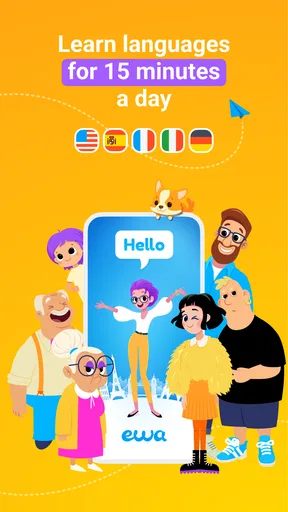
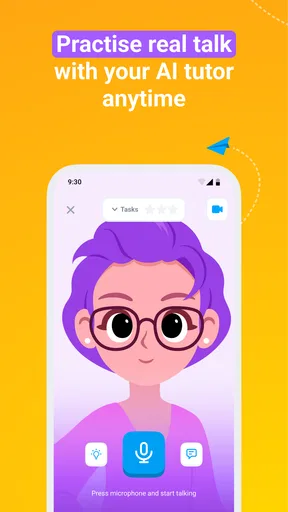
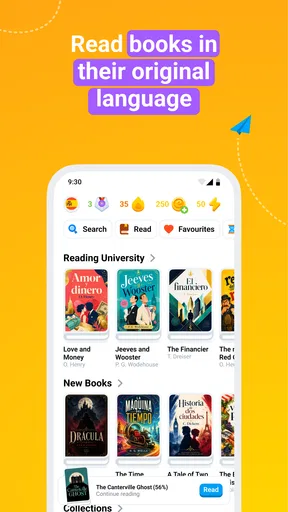
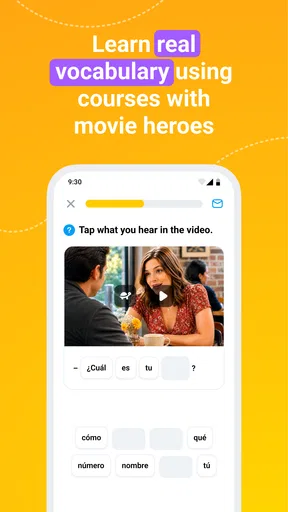
 Analysis by AppCompare
When I judge a language app, I care as much about the time it takes to get into a useful exercise as I do about the lesson itself. EWA: Learn English & Spanish is built around short learning sessions and material drawn from books and audio, so it suits a quick practice break better than a long, textbook-style study block. I’d treat it as a convenient way to keep English or Spanish in my day, not as a shortcut to fluency or a replacement for every kind of language practice.
Quick sessions, with a little setup
The short-lesson approach makes it easy to start with a small goal: review a few words, listen to a passage, or work through one activity while waiting for an appointment. That is useful when I have an unpredictable schedule, because I don’t need to reserve a whole evening to feel that I’ve made progress. The trade-off is that a series of short sessions can feel fragmented unless I decide what I’m working toward before opening the app.
I’d make that decision concrete. For example, if I’m learning Spanish for a trip, I can focus each session on understanding and remembering useful expressions rather than tapping through unrelated material. If I’m using English for work, I can listen for phrases and sentence patterns that might help in a real conversation. A simple note outside the app—one phrase I want to reuse, or one point I want to review—can turn a brief lesson into a more deliberate routine.
What happens when you use it heavily?
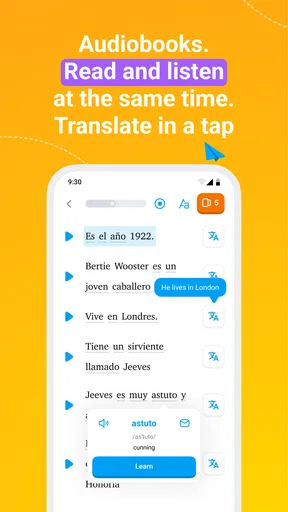
Learning from books and audio gives EWA a different feel from apps that are mostly built around streaks, flashcards, or isolated drills. It can be more enjoyable when I want language in context, but it also asks for more attention: listening is not always a good fit for a noisy bus, a shared room, or a moment when I can’t concentrate. I’d switch to a quieter activity when the setting makes audio hard to follow rather than treating every session as equally productive.
There is also a useful distinction between recognizing a word and being ready to say it. Reading a familiar phrase or understanding it in a recording can feel like mastery, but spontaneous conversation requires recall under pressure. I’d pair EWA with a small real-world task: say a new phrase aloud after a lesson, describe what I’m doing in the target language, or try to use a word in a message. That extra step helps expose gaps that tapping through an exercise may not reveal.
Longer study periods can be less effective if I keep moving through content without revisiting difficult material. My practical approach would be to stop when attention fades, then return later with one specific aim. This is a better fit for a compact learning tool than expecting it to carry an entire study plan on its own.
Reliability and sensible recovery
I would not assume that every session will feel equally smooth in every setting. Audio-based learning depends on being able to hear clearly, and a lesson interrupted by a call or a change in surroundings may be harder to resume mentally even if the app itself remains available. When I know I’ll be interrupted, I’d choose a short activity and keep track of the last idea I understood, so returning to study does not mean starting over in my head.
Worth Reading Before You Choose

EA SPORTS FC Mobile 26 Is a Bigger Football Game, but It Takes Time

Flipboard Shows What News Apps Must Do Beyond the Feed

Switching to Android Auto Means Rethinking Your Driving Routine

Google Calendar Makes a Crowded Week Easier to Manage

Ludo King Makes the Most of the Minutes Between Plans

Baby Panda World Brings Quick Play to Modern Phones, but Its Game Library Feels Busy
For important progress, I’d avoid relying on memory alone. A quick personal note about the words or lesson point I want to revisit gives me a dependable way to pick up my study thread. That is not a criticism of EWA’s progress tools; it is a sensible habit for any learner who switches between short sessions and wants to make them add up.
Device fit and practical expectations
EWA is an education app from Lithium Lab Pte Ltd. It is free to install, with in-app purchases ranging from $0.99 to $149.99 per item, so I’d check the purchase options carefully before committing to anything. Its age rating is Everyone 10+, and it is available for devices running Android 9 or later. The current version is 10.97.0, while its release date was May 19, 2017.
I wouldn’t make a strong claim about battery use, storage needs, or loading speed without testing a particular device and connection. The practical constraint I can judge is the learning environment: audio calls for a place where I can hear, and a small screen is more comfortable for short reading than for prolonged study. If my phone is older or I have limited space, I’d check that the app installs and runs comfortably before building a daily routine around it.
The app has a 4.8 average from around 943,000 ratings, with about 7,700 reviews and over 10 million installs. That level of uptake makes it a well-established choice, though popularity cannot tell me whether its lesson style will suit my goals. I’d use the free access to judge that fit before spending money, especially if I’m unsure whether I prefer contextual reading and audio or a more structured course.
How I’d make EWA part of a real routine
I’d keep the routine small enough to survive a busy week: choose one short reading or audio task, then carry a single phrase into the rest of the day and see whether I can recall it without opening the app. That gives each session a purpose beyond simply completing it, and it makes the next question easier to answer: who is likely to enjoy learning this way?
A useful everyday workflow
Picture a typical weekday: I have a few minutes before work, a noisy commute, and a quieter break later on. I’d use the first pause for a brief reading activity, skip listening when the environment is too loud, then return during the break to replay or review a phrase that caught my attention. In the evening, I might try to use that phrase in a sentence without looking. This small sequence is more realistic than expecting a single uninterrupted session to cover reading, listening, and speaking all at once.
One non-obvious benefit of this approach is that it lets me separate exposure from recall. A book passage or audio example gives me exposure to how language is used; trying to retrieve a phrase later tests whether it stuck. If recall fails, I know what deserves another look. That is more useful than judging a session only by how many screens or exercises I completed.
Who will get the most from it?
I’d recommend EWA to someone who wants a low-friction way to return to English or Spanish regularly, especially if learning through books and audio feels more inviting than working through a formal course. It may also suit a learner who already has some basics and wants extra contact with the language between classes, travel plans, or conversations. The short-session format helps people who need flexibility, while the contextual material can make practice feel less like memorizing a bare list.
I’d be more cautious if I were starting from zero and needed a tightly sequenced explanation of every grammar point, or if I had an exam with a specific syllabus and deadline. In those cases, I’d pair EWA with a course or teacher that follows the relevant curriculum. Someone who mainly wants live conversation should also look for regular speaking practice with another person; an app session can help prepare, but it cannot reproduce the unpredictability and social pressure of a real exchange.
How it differs from familiar alternatives
Compared with a flashcard-first app, EWA’s appeal is the chance to meet words in reading and audio rather than only reviewing prompts. Flashcards can be better when I need precise, repeated recall of a defined vocabulary set. Compared with a conventional course, EWA feels more approachable for spare moments, but a structured course may do a better job of guiding a learner from one grammar topic to the next. These approaches can complement each other: I can use EWA for regular contact with the language and another resource for a clear syllabus or targeted correction.
The choice also depends on how I like to learn. If I enjoy stories and listening, contextual material gives me a reason to stay engaged. If I prefer explicit explanations, carefully graded exercises, or direct feedback from a human tutor, I may find the app less complete as a main learning method. I would decide based on the kind of practice I actually return to, not on the assumption that one format works for everyone.
Making the free option and purchases work for you
Because EWA is free to install but includes in-app purchases, I’d explore the available learning experience before deciding whether to pay. I would first ask myself whether I’m opening it consistently, whether its materials match my level, and whether the activities help me use language beyond the app. If the answer is no, a purchase is unlikely to solve a mismatch in learning style. If the routine is already useful, then I can weigh the offered purchase against how often I expect to use it.
I would also keep my goal narrow at the beginning. “Improve Spanish” is too broad to guide a short session; “understand a short passage more easily” or “remember a handful of phrases I can use while travelling” gives me a clearer way to judge progress. This matters particularly when an app offers several kinds of content: choosing one thread prevents browsing from taking up more time than learning.
First Impressions and User Interface
When you first open EWA: Learn English & Spanish, you're greeted with a clean, intuitive interface. It's easy to navigate, and even if you're not the most tech-savvy person, you'll find your way around in no time. The color scheme is pleasing, making it a joy to spend time learning on the app without straining your eyes.
The app is designed to be user-friendly, with tabs that guide you through various lessons, challenges, and interactive content. There’s no clutter, just straightforward paths to learning new languages effectively.
Lessons and Learning Content
EWA offers a variety of lessons tailored to different proficiency levels. Whether you're a newbie or brushing up on your skills, there’s something for everyone. The lessons are bite-sized but packed with useful content. This means you can learn at your own pace without feeling overwhelmed.
One of the standout features is the integration of popular books and TV shows into the lessons. Imagine learning Spanish while following your favorite series! It makes learning highly engaging and aligns well with real-world usage.
- Grammar and Vocabulary: The app provides comprehensive grammar explanations and vocabulary lists to bolster your understanding.
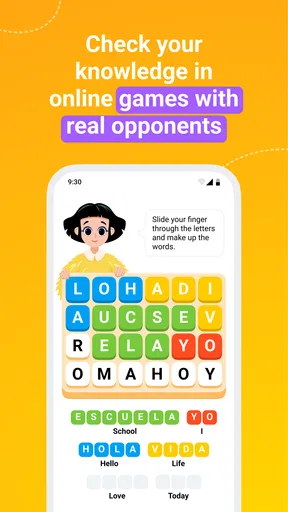
- Interactive Quizzes: Test your knowledge with fun and interactive quizzes that reinforce what you've learned.
Speaking and Listening Practice
For those who dread speaking in another language, EWA has you covered. The app offers speaking exercises that allow you to practice pronunciation. It uses advanced speech recognition technology, giving you feedback on how well you're doing. This is a crucial feature because speaking is often the most challenging part of learning a new language.
Listening exercises are equally well-crafted. By listening to native speakers in different contexts, you get a feel for the rhythm and nuances of the language. It’s like having a private tutor guiding you through every step.
Customization and Progress Tracking
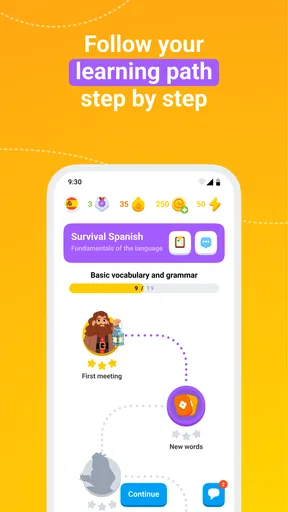
One thing I love about EWA is its customization options. You can tailor your learning path based on your personal goals. Want to focus more on conversational skills? No problem. The app lets you adjust your lessons accordingly.
The progress tracking feature is another highlight. It’s satisfying to see how far you’ve come, and it keeps you motivated to continue. The app provides insights into your learning habits, helping you identify areas for improvement.
Subscription Model and Accessibility
EWA offers a free version with limited features, but to unlock the full potential, you might want to consider the premium subscription. While some might feel hesitant about paying, I found the premium features to be worth the investment, especially if you’re serious about mastering a new language.
The app is available on both Android and iOS, ensuring that you can learn on-the-go no matter what device you’re using. The offline mode is a lifesaver for those moments when you’re without an internet connection but still want to squeeze in some learning.
Final Thoughts
In conclusion, EWA: Learn English & Spanish is an impressive language-learning app that combines fun, flexibility, and effectiveness. It’s more than just a collection of lessons; it’s a well-rounded tool that adapts to your learning style. Whether you’re learning for travel, work, or personal growth, EWA is a fantastic companion. So, if you’re ready to embark on a new linguistic adventure, give it a shot!
Pros
- User-friendly interface makes learning easy.
- Wide variety of interactive exercises.
- Offline mode available for learning on the go.
- Regular updates with new content.
- Supports multiple languages for diverse learning.
Cons
- Limited free content without subscription.
- Some exercises may feel repetitive.
- Occasional in-app ads can be distracting.
- Requires internet for certain features.
- Voice recognition could be improved.
FAQs for EWA: Learn Languages
What languages can I learn with EWA?
EWA offers language learning for English and Spanish. The app provides courses tailored to different proficiency levels, ensuring that both beginners and advanced learners can find suitable material. The learning approach includes interactive activities, vocabulary games, and real-life dialogues to enhance language acquisition effectively.
Is EWA suitable for beginners?
Yes, EWA is designed to accommodate learners of all levels, including beginners. The app starts with foundational vocabulary and grammar, gradually progressing to more complex concepts. Beginners will benefit from its structured lessons, interactive exercises, and engaging content that makes learning accessible and enjoyable.
Does EWA offer offline learning options?
EWA provides users with the ability to download lessons for offline use. This feature allows learners to continue their studies without internet connectivity, making it convenient for those who travel frequently or have limited access to reliable internet. Simply download the desired content and learn on the go.
What makes EWA different from other language apps?
EWA stands out due to its use of real-life scenarios, interactive games, and a vast library of audiobooks and videos. The app also includes a unique feature where users can learn through popular book excerpts and movie dialogues, enhancing vocabulary and comprehension in a fun and engaging way. Additionally, personalized learning paths ensure tailored progress tracking.
Are there any subscription costs associated with EWA?
EWA offers a free version with basic features. However, to access the full range of content and advanced features, a subscription is required. The premium version provides unlimited access to all lessons, personalized learning plans, and additional resources like audiobooks and videos. Users can choose from monthly, quarterly, or annual subscription plans.


